
SBS and POS
The System Balance Signal (SBS) is published on this page. The SBS is the sum of all Portfolio Imbalance Signals (POSs) of the shippers active in the GTS network.
The balancing regime is based on near-real-time data relating to the cumulative imbalance position (POS) of each shipper and of the system as a whole (SBS). The SBS is equal to the sum of all POSs and therefore reflects the (im)balance position of the transmission network.
What is the POS?
Imbalance is the difference (on an hourly basis) between the realised near-real-time entry and exit allocations within a portfolio. For programmes with damping (i.e. the difference between the planned exit and entry submitted by a shipper in a programme), the imbalance is equal to the difference between the damping in the programme and the difference between the near-real-time entry and exit allocations.
The programmes (and therefore also the damping, if applicable) are submitted and determined the day before the actual day of transport.
Depending on the type of entry and exit points in a portfolio, ‘near real-time’ means ‘with a delay of approximately 5 minutes’ in practice. Based on the near real-time allocations, the final near real-time imbalance is calculated for each portfolio every hour. If a portfolio consists of an entry and an exit programme, the net imbalance is calculated. The realised imbalance in an hour is added to the POS of the previous hour to calculate the (cumulative) POS for the current hour. When all POSs are available, the SBS is calculated as the sum of all POSs.
The POS becomes final approximately 20 minutes after each hour.
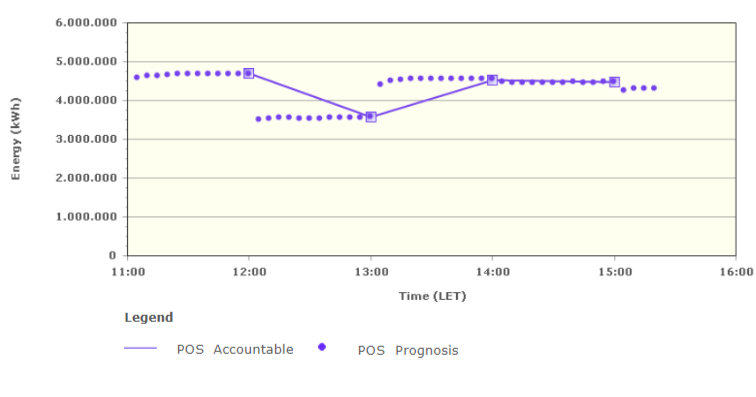
Because POS is commercially sensitive information, only the shipper itself can access the status of its individual POS. This information is made available via the Gasport online platform and via the B2B interface.
What is the SBS?
The SBS is an aggregation of the POSs of all shippers active in the GTS network.
Every five minutes throughout the hour, a forecast for the SBS at the end of that hour is calculated based on the expected POSs. The predicted SBS is a parameter used to determine whether or not to initiate a balancing action.
When the system as a whole is “short”, portfolios that are “short” are considered “causers”, and portfolios that are “long” are considered “helpers”. The opposite is true when the system is “long”. Together with the SBS, the totalised positions of both helpers and causers are published. By publishing the total POS volume of the helpers and the causers, a shipper causing an imbalance is able to calculate the gas volume that will be allocated to its portfolio as a result of a possible balancing action on the ICE Endex gas exchange.
Buffer zones
The flexibility of the national gas transport network varies depending on the transport load and is therefore divided into so-called buffer zones. Based on the expected transport load (in accordance with the programmes submitted by the shippers), the size of the buffer zones per hour is announced no later than two hours before the start of the gas day. The hourly values determined are not altered after publication.
The balancing system has the following buffer zones:
- Dark green zone
- Light green zone
- Orange zone
- Red zone
As long as the SBS is in the dark green zone, no balancing action will be taken. If the SBS moves outside this zone, this triggers the process for balancing actions.
If the predicted SBS enters or remains in the red zone and it is expected that a balancing action will not be sufficient to safeguard system integrity, an emergency situation will be declared. GTS will then be entitled to instruct shippers to change their feed-in at entry points (including entry points with connected gas storage facilities) and (as a last resort) their off-take at exit points.
The border values of the buffer zones for the next gas day can be consulted via the “Buffer zones” button below.
Graphic SBS
The most recent status of the SBS can be obtained via the “Actual SBS” button. The graph shows a brief history of the SBS and the forecast for the coming hour (the forecast value). In addition to the SBS, the graph shows the totals for the helpers, the causers as well as the buffer zones.
Historical SBS
Below and via the “Historical SBS” button, you can find a history of the SBS for the past 31 days. You can zoom in by moving the slicers under the graph back and forth.
If preferred, you can export the historical data via “Meer opties”.
